







License Transfer – Trust or Control?
In general, there are three strategies for storing licenses on the user side: in separate hardware (a dongle), bound to a specific computer, or user-bound in the cloud. This article examines what happens when a user changes computers.
There may be various reasons for this. Some users operate multiple computers at different locations, while others receive new machines with improved performance. For the actual process, it makes little difference whether the software is consumer-oriented or business software. What matters far more is whether the user is permanently, or at least regularly, online. A similar situation occurs in business environments when a user changes roles and a new user takes over the license.
Simple and Fast: The Dongle
With a dongle such as a CmDongle, the process is straightforward. The dongle is handed over like a relay baton, from computer to computer or from user to user: unplug, plug in, and continue working.
Users who would prefer to install and use the software simultaneously on multiple devices typically raise two concerns:
“I can’t work if I forget the dongle.”
Let’s consider three application scenarios:
- The user works on a mobile computer: In this case, the dongle is typically connected directly to the computer. CodeMeter provides an especially compact USB dongle designed specifically for this purpose.
- The user accesses their computer via Remote Desktop: Here, the dongle remains plugged into the remote office computer where the software is running.
- The user works on a computer at the destination location: In this scenario, planning is required, including the installation of the appropriate version of the software. This planning should also take the dongle into account.
“My colleague, with whom I share the license, is at another location. I can’t mail the dongle back and forth every time.”
This is precisely what a single-user license is designed to prevent. For such cases, floating network licenses are available, which can be shared via a local license server (VPN) or a cloud-based license server.
Designed for Mobility: License in the Cloud
With a purely cloud-based license such as a CmCloudContainer, licenses are permanently stored and used in the cloud. CodeMeter Cloud provides Personal and Enterprise CmCloudContainers.
A Personal CmCloudContainer is tied to an individual user and contains their personal single-user licenses. By logging into the software vendor’s License Portal, the user can connect the container to any computer. They can then use their licenses interchangeably from different machines. Simultaneous use is monitored in the cloud so that a license can only be used by one computer at a time.
An Enterprise CmCloudContainer can be shared directly or indirectly among multiple users. This allows floating network licenses to be implemented in the cloud. In this case, concurrent usage is also counted in the cloud.
In principle, this is an optimal solution. However, users raise the concern:
“This doesn’t work if I’m offline or if my Internet connection is unstable.”
Personal CmCloudContainers currently require a continuous online connection. For Enterprise CmCloudContainers, license borrowing provides a ready-made solution. A selected number of licenses can be temporarily borrowed to the user’s computer and used offline during that period. During the borrowing period, the license remains reserved on the cloud server and cannot be used elsewhere. The borrowing duration can be defined by the software vendor: the longer the period, the less frequently the user needs to be online; the shorter the period, the faster the user can switch to another machine.
Offline Use: License on the Computer
The most cost-effective option is a local license file such as a CmActLicense. This eliminates the cost of external hardware (dongle) or cloud server infrastructure. Only a server for license activation is required. Offline usage is also possible, including file-based license transfers for fully air-gapped systems.
But how does license transfer work in this case? Three scenarios must be considered:
- The old computer is available.
- The old computer is currently unavailable but may become available later.
- The old computer is no longer available (for example, it has been decommissioned).
With CodeMeter License Central and CodeMeter License Portal, the software vendor can select or combine various options.
Receipt Required
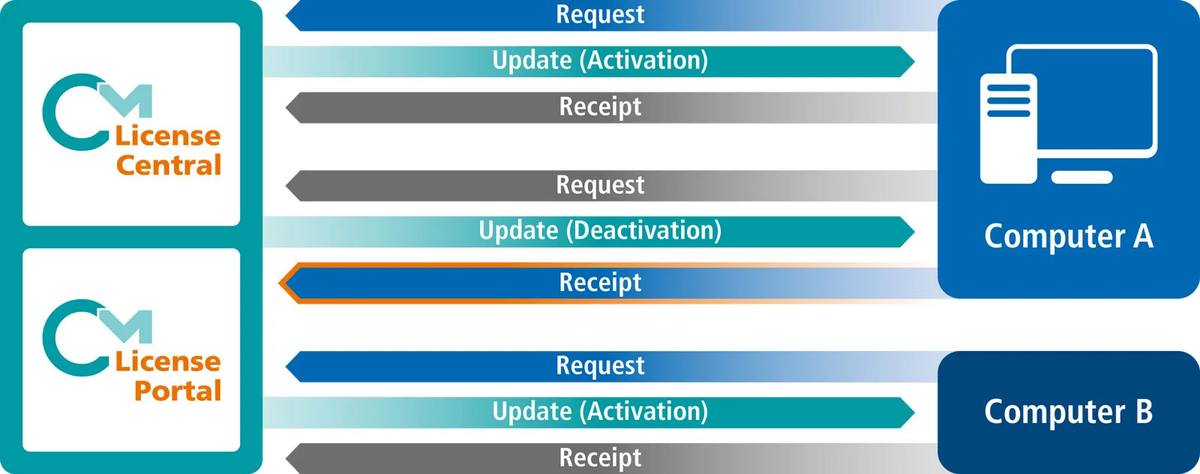
The default option requires a deactivation receipt from the old computer before the license can be activated on the new one. This setting prevents any license misuse because there is never a duplicate copy of the license.
However, this approach does not address scenarios (2) and (3) and can be cumbersome for fully offline systems. The user transfers the deactivation update from an online computer to the offline machine, retrieves the receipt confirming execution from the offline machine, and uploads it via WebDepot or CodeMeter License Portal using the online computer.
Reactivation Allowed
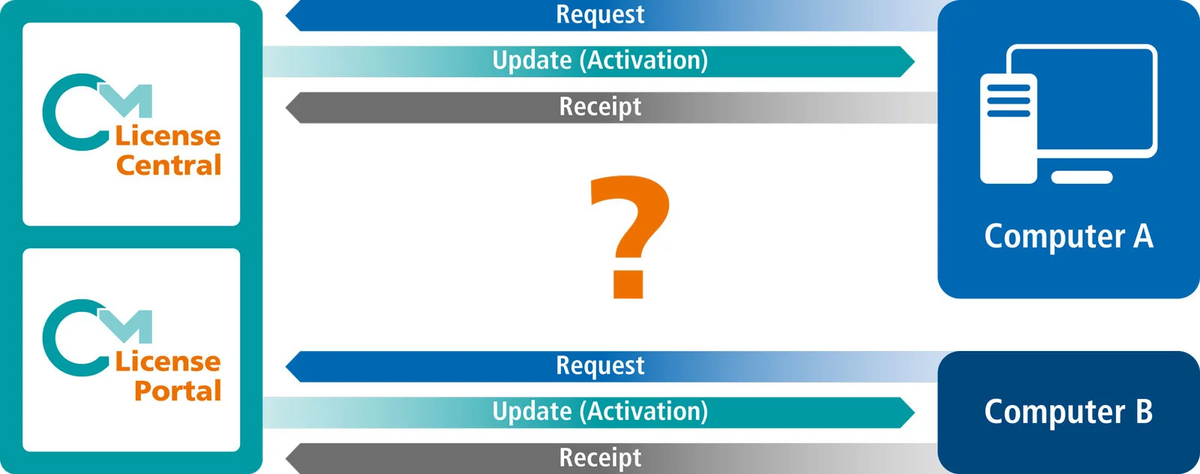
In addition to the receipt requirement, the software vendor may allow reactivations (license recovery). In this case, within a defined limit (for example, once initially and once per year), the user may activate the license on a new computer without returning it from the old one.
This covers the third scenario, but creates a gray area if the old computer still exists and is in use. Once the permitted number of reactivations has been reached, the software vendor can manually authorize additional reactivations for specific licenses.
Possible countermeasures to prevent permanent duplicates in scenarios (1) and (2) include sanctions such as withdrawing the license or blocking the entire computer if it reappears. Continued use on the old computer would then require manual intervention by the software vendor.
Push Deactivation
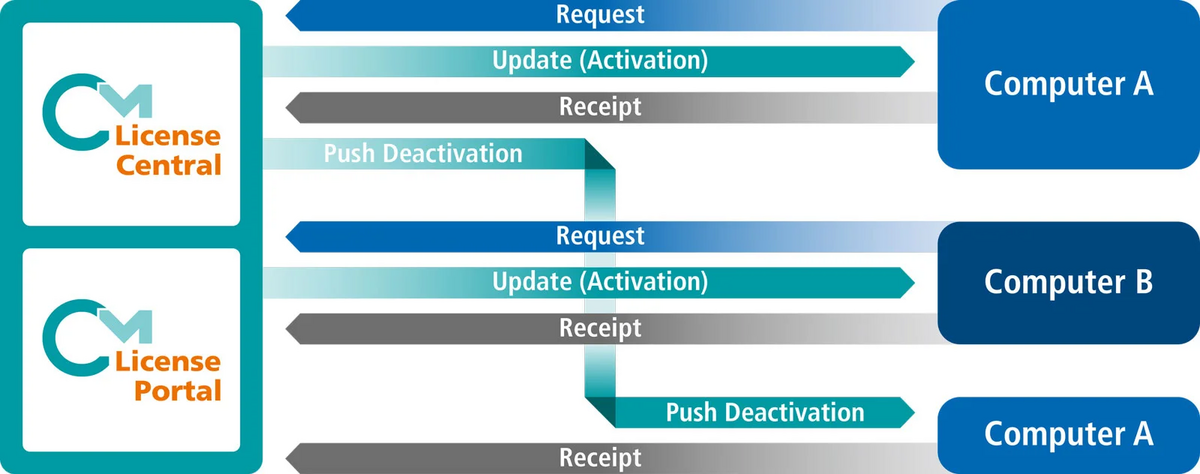
Starting with version 25.09, a third option is available in CodeMeter License Portal: licenses can now be deactivated on the old computer via push update. A push update is generated on the server without requiring prior contact with the old computer. The update is automatically confirmed in the background, allowing the license to be immediately reactivated.
As long as no receipt confirming execution of the push update is received, CodeMeter License Central will repeatedly deliver the push update whenever any programming action occurs on that computer (more precisely, within that CmActLicense). This means that at the next opportunity, the license is removed from the old computer, without penalizing the user for further use of that machine.
This option covers all three scenarios. The license is activated on the new computer and removed from the old one, when possible. License transfers are logged in CodeMeter License Central, enabling reports that show how often users have transferred licenses without subsequent removal from the old computer. Individual rules can be defined to specify when further transfers require explicit approval from the software vendor.
Online-Update
Particularly in the third scenario, where the old computer is no longer available, the software vendor must trust the user that the license is not being used twice. Unfortunately, it is impossible to distinguish whether the old computer truly no longer exists.
An additional safeguard is to integrate an online update mechanism into the software, for example through a Software Activation Wizard. This component periodically (for example daily or weekly) contacts CodeMeter License Portal and checks for pending updates for the CmContainer. If updates exist, they are downloaded, applied, and a receipt is returned.
In addition to deactivated licenses, subscription renewals or automatic updates to new versions or features can also be handled in this way. This mechanism is available not only for CmActLicenses but also for CmDongles and CmCloudContainers.
Time-Limited Licenses
Another option is to issue short-term licenses, such as those limited to 30 days. The license is then automatically renewed in CodeMeter License Portal. If the customer is at least occasionally online, the license in the new CmContainer can be automatically renewed. A renewal attempt on the old computer deletes the license there.
If the old computer remains fully offline and receives no license updates, the license will automatically expire. Push updates can simplify the renewal process on the old computer to a monthly download of the extension.
CodeMeter License Central and CodeMeter License Portal offer multiple options for managing license transfers. Particularly in cases where the original license has been lost, the software vendor can decide whether to approve each case manually or offer the user a limited self-service recovery option. Through regular online synchronization and time-limited licensing, potential misuse of self-service recovery can be significantly reduced.
KEYnote 51 – Edition Spring/Summer 2026